<?xml version="1.0" encoding="utf-8"?><feed xmlns="http://www.w3.org/2005/Atom" ><generator uri="https://jekyllrb.com/" version="4.4.1">Jekyll</generator><link href="https://minerva.sandelman.ca/feed.xml" rel="self" type="application/atom+xml" /><link href="https://minerva.sandelman.ca/" rel="alternate" type="text/html" /><updated>2025-09-11T18:54:21-04:00</updated><id>https://minerva.sandelman.ca/feed.xml</id><title type="html">Minerva</title><subtitle>Minerva is a reference implementation of the ANIMA BRSKI MASA, Join Registrar and Autonomic Control Plane (RPL and IPsec).</subtitle><author><name>mcr</name></author><entry><title type="html">Minerva Fountain beta-customer configuration</title><link href="https://minerva.sandelman.ca/appliances/2023/01/28/fountain-ova-release-202301.html" rel="alternate" type="text/html" title="Minerva Fountain beta-customer configuration" /><published>2023-01-28T00:00:00-05:00</published><updated>2023-01-28T00:00:00-05:00</updated><id>https://minerva.sandelman.ca/appliances/2023/01/28/fountain-ova-release-202301</id><content type="html" xml:base="https://minerva.sandelman.ca/appliances/2023/01/28/fountain-ova-release-202301.html"><![CDATA[<p>A new version of the Fountain Registrar Virtual Appliance has been posted to
    http://sns.cooperix.net/ova/minerva-fountain-20230126.ova</p>

<p>(Yes, on http, not https for now.  The files are big enough that I’m still finding the best place to distribute them)</p>

<p>These images do a number of things, and the will slowly get better.</p>

<p>What this one does:</p>

<ol>
  <li>boots image with mDNS “minerva-fountain”</li>
  <li>login as root/root on the console, and change the password.  No root login on ssh with passwords.  If you need help, then keep my key in the root account.</li>
  <li>IPv4 and IPv6.</li>
  <li>initializes the database, and then creates a root CA, and then a few EE certificates for use by the Registrar for it’s TLS.  And a subordinate CA for signing LDevID certificates.</li>
  <li>It opens port 8443 to listen for BRSKI-EST connections.</li>
  <li>It opens port 5683 (CoAPS) for Constrained BRSKI DTLS/COAP connections.</li>
  <li>It includes a mechanism to do GRASP <em>AN_join_proxy</em> announcements as per RFC8994, although this is not enabled by default.</li>
  <li>It creates some certificates for use by the PostgresQL bucardo replication system.</li>
</ol>

<p>It is possible to use the bucardo setup to arrange to do a multi-master replication of the database.  This is not configured by default, but the intention is that this is used to do forklift upgrades of the image, while saving the data.</p>

<p>There are many issues to be resolved, which the <a href="/virtualmachines">VirtualMachines</a> records.</p>

<p>This image can be used as part of scalable three-tier application framework.
It includes the Passenger and Apache front end, and the Postgres database backend.</p>

<p>After setting the root password, the Registrar is ready to operate as a promiscuous registrar.</p>]]></content><author><name>phlow</name></author><category term="appliances" /><category term="fountain" /><summary type="html"><![CDATA[A new version of the Fountain Registrar Virtual Appliance has been posted to http://sns.cooperix.net/ova/minerva-fountain-20230126.ova]]></summary></entry><entry><title type="html">Minerva Fountain MASA R&amp;amp;D configuration</title><link href="https://minerva.sandelman.ca/openssl/2022/06/12/configuring-fountain-development.html" rel="alternate" type="text/html" title="Minerva Fountain MASA R&amp;amp;D configuration" /><published>2022-06-12T00:00:00-04:00</published><updated>2022-06-12T00:00:00-04:00</updated><id>https://minerva.sandelman.ca/openssl/2022/06/12/configuring-fountain-development</id><content type="html" xml:base="https://minerva.sandelman.ca/openssl/2022/06/12/configuring-fountain-development.html"><![CDATA[<p>The Fountain Registration Authority (Registrar) is an RFC8995 compliant BRSKI-MASA server.
It includes support for both RFC8366 vouchers, and COSE/CBOR based constrained vouchers.
It speaks both HTTPS and CoAPS (CoAP over DTLS).</p>

<p>It is designed to be deployed into a three-tier application framework with a front-end like Passenger, and a Postgres database backend.
It is also available in the form of LXC, VMDK, and docker images, as well as as virtual appliance format. <a href="/virtualmachines">VirtualMachines</a></p>

<p>Note that while the MASA is operated by the manufacturer of an IoT device or ACP router,
the Registrar is operated by the owner of the network to which the device should onboard.</p>

<p>This guide does not describe how to do production deployment, but rather how to set it up for R&amp;D work.
In such a configuration it runs as a single threaded foreground process answering HTTPS requests on localhost using a unique port number.</p>

<p>In many other systems, the HTTPS and certificate aspect of the system is not an essential part of the mechanism and R&amp;D uses can often skip that.
This is not the case for BRSKI: the security mechanisms are woven into the protocol and so getting them all setup correctly is essential for correct usage.</p>

<p>Assuming that the code has been installed in <code class="language-plaintext highlighter-rouge">/someplace/fountain</code> as described in
<a href="/openssl/2022/06/09/building-local-minerva.html">Minerva Highway MASA and Fountain JRC local configuration use</a>, then a test case situation is configured easily using the included <code class="language-plaintext highlighter-rouge">can-o-pg</code> present in the <code class="language-plaintext highlighter-rouge">etc</code> submodule.</p>

<p>This also assumes that you have already configured highway on the same machine.</p>

<p>First, open a new window, or use screen or tmux.</p>

<div class="language-plaintext highlighter-rouge"><div class="highlight"><pre class="highlight"><code>% cd /someplace/fountain/
% make
</code></pre></div></div>

<p>This step should locate the postgresql server executable and then initialize a postgresql cluster in the directory <code class="language-plaintext highlighter-rouge">run/dbcluster</code>.  The command <code class="language-plaintext highlighter-rouge">make stop</code> will stop the cluster, and the command <code class="language-plaintext highlighter-rouge">make clean</code> will completely remove it.</p>

<p>If you get an error</p>
<div class="language-plaintext highlighter-rouge"><div class="highlight"><pre class="highlight"><code>WHERE IS POSTGRESQL/initdb --encoding=utf8 -D /someplace/highway/run/dbcluster
</code></pre></div></div>

<p>then the scripts failed to find an installed version of postgresql 10,11,12,13,14.
Please install postgresql if it isn’t installed, or fix etc/findpsql.sh.</p>

<p>To complete the template installation, copy the generated database.yml:</p>
<div class="language-plaintext highlighter-rouge"><div class="highlight"><pre class="highlight"><code>% cp etc/database.yml ./config/database.yml
</code></pre></div></div>

<p>Update the database schema and run the test cases:</p>
<div class="language-plaintext highlighter-rouge"><div class="highlight"><pre class="highlight"><code>% bundle exec rake db:migrate
% bundle exec rake spec
</code></pre></div></div>

<p>As of 2022-06-13, there should be 170 examples, with no failures, but there may be 8 pending test cases.</p>

<p>There are a number of Registrar specific tasks that rake can do:</p>
<div class="language-plaintext highlighter-rouge"><div class="highlight"><pre class="highlight"><code>% rake -T
...
rake fountain:cert2pubkey                # Read a certificate from CERT= and extract ...
rake fountain:grasp                      # Start a GRASP server on port 7732
rake fountain:mud_telemetry              # Create process that listens for telemetry ...
rake fountain:s0_set_hostname            # Do initial setup of system variables, non-...PORT=xxx
rake fountain:s0_setup_jrc               # Do initial setup of sytem variables
rake fountain:s1_registrar_ca            # Create initial self-signed CA certificate ...
rake fountain:s2_create_registrar        # Create a certificate for the Registration ...
rake fountain:s3_admin_cert              # Create initial administrative account with...
rake fountain:s4_domain_authority        # Create a keypair for the domain owner to...
rake fountain:s5_add_brski_manufacturer  # Add BRSKI manufacturer from CERT=file,...
rake fountain:send_voucher_request       # send signed voucher request VRID=xx ...
rake fountain:sign_csr                   # Read a CSR from CSR= and sign it as ...
...
</code></pre></div></div>

<p>To facilitate testing and R&amp;D work, the fountain repo comes with a full set of configured objects and database entries in the form of fixtures.
This includes certificates and private key pairs that can be used for testing.</p>

<div class="language-plaintext highlighter-rouge"><div class="highlight"><pre class="highlight"><code>% bundle exec rake db:fixtures:load
</code></pre></div></div>

<p>Start the HTTPS server locally on port 8443 using:</p>

<div class="language-plaintext highlighter-rouge"><div class="highlight"><pre class="highlight"><code>$ RAILS_ENV=development ./startjrc
</code></pre></div></div>

<p>Note that there is a different script, “startj6rc” which starts the Constrained Version,
which will be covered in a different posting.</p>

<p>Open another window/shell and run:</p>

<div class="language-plaintext highlighter-rouge"><div class="highlight"><pre class="highlight"><code>$ curl -k https://fountain-test.example.com:8443/status.json; echo
{"Devices":0,"Vouchers":3,"Requests":1}
</code></pre></div></div>

<p>Now, change to the reach directory and configure it:</p>

<div class="language-plaintext highlighter-rouge"><div class="highlight"><pre class="highlight"><code>% ( cd .. &amp;&amp; ln -s ChariWTs chariwt )
% cd ../reach &amp;&amp; bundle config set --local path 'vendor/bundle' &amp;&amp; bundle install &amp;&amp; bundle exec rake -T
</code></pre></div></div>

<p>Reach is a client library that speaks HTTPS to the Registrar to obtain a voucher, and then to enroll a device into the Registrar’s PKI using EST.</p>

<p>Reach comes with a number of IDevID certificates (and private keys) generated and coordinated by various instances of Highway, as well as some other vendor’s MASA.</p>

<p>The files are stored in a per-instance directory under spec/files/product, and for highway they are identified by at EUI-48.  (The upper bits, 00-D0-E5, belong to a dead company that the author used to work at)</p>

<div class="language-plaintext highlighter-rouge"><div class="highlight"><pre class="highlight"><code>minerva@jiggers:/someplace/reach$ cd spec/files/product/
minerva@jiggers:/someplace/reach/spec/files/product$ ls
00-D0-E5-01-00-16  00-D0-E5-02-00-39  00-D0-E5-F2-00-01  00-D0-E5-F2-00-0E  e75_100a
00-D0-E5-02-00-2D  00-D0-E5-03-00-03  00-D0-E5-F2-00-02  00-D0-E5-F2-00-10  Smarkaklink-1502449999
00-D0-E5-02-00-2E  00-D0-E5-90-00-1A  00-D0-E5-F2-00-03  00-D0-E5-F2-00-11
minerva@jiggers:/someplace/reach/spec/files/product$ cd 00-D0-E5-F2-00-02
minerva@jiggers:/someplace/reach/spec/files/product/00-D0-E5-F2-00-02$ ls -l
total 68
-rwxr-xr-x 1 minerva minerva  407 Jun 11 15:07 checkit
-rwxr-xr-x 1 minerva minerva  166 Jun 11 15:07 constrained.sh
-rw-r--r-- 1 minerva minerva   74 Jun 13 00:27 csrattr.der
-rw-r--r-- 1 minerva minerva  291 Jun 13 00:27 csr.der
-rw-r--r-- 1 minerva minerva  644 Jun 11 15:07 device.crt
-rw-r--r-- 1 minerva minerva   59 Jun 11 15:07 highway-test.txt
-rw-r--r-- 1 minerva minerva  749 Jun 11 15:07 jrc_prime256v1.crt
-rw-r--r-- 1 minerva minerva  227 Jun 11 15:07 key.pem
-rw-r--r-- 1 minerva minerva  546 Jun 11 15:07 ldevid.der
-rw-r--r-- 1 minerva minerva  558 Jun 11 15:07 masa.crt
-rw-r--r-- 1 minerva minerva  899 Jun 11 15:07 ownerca_secp384r1.crt
-rw-r--r-- 1 minerva minerva 5336 Jun 11 15:07 parboiled_vr_00-D0-E5-F2-00-02.b64
-rw-r--r-- 1 minerva minerva 1509 Jun 11 15:07 vendor.crt
-rw-r--r-- 1 minerva minerva 1601 Jun 13 00:27 voucher_00-D0-E5-F2-00-02.pkcs
-rwxr-xr-x 1 minerva minerva  293 Jun 11 15:07 voucher.sh
-rw-r--r-- 1 minerva minerva 1682 Jun 13 00:27 vr_00-D0-E5-F2-00-02.pkcs
</code></pre></div></div>

<p>The file voucher.sh can be used to run everything properly, it basically just CDs to the top directory and then runs the code with current directory as a product directory.  It can be run locally, or via a path and it will figure things out.</p>

<div class="language-plaintext highlighter-rouge"><div class="highlight"><pre class="highlight"><code>(cd $(dirname $0)/../../../..
 bundle exec rake reach:enroll_http_pledge PRODUCTID=spec/files/product/00-D0-E5-F2-00-02 JRC=https://fountain-test.sandelman.ca:8443/
)
</code></pre></div></div>

<p>Run ./voucher.sh (some lines ommitted):</p>

<div class="language-plaintext highlighter-rouge"><div class="highlight"><pre class="highlight"><code>minerva@jiggers:/someplace/reach/spec/files/product/00-D0-E5-F2-00-02$ ./voucher.sh
MASA/JRC provided voucher of type application/voucher-cms+json; charset=utf-8
Voucher connects to /DC=ca/DC=sandelman/CN=fountain-test.example.com
vs:   /DC=ca/DC=sandelman/CN=fountain-test.example.com
Voucher authenticates this connection!
Other: #&lt;Net::HTTPUnauthorized:0x0000558c89a3ccd8&gt;
mv: cannot stat '../../../../tmp/csr*': No such file or directory
</code></pre></div></div>

<p>This did not succeed in doing the enrollment because the default trust was not set on the Registrar to for a promiscious trust.   Observer in the fountain window that it:</p>

<ol>
  <li>Reached out to the MASA:</li>
</ol>

<div class="language-plaintext highlighter-rouge"><div class="highlight"><pre class="highlight"><code>Contacting server at: https://highway-test.example.com:9443/.well-known/brski/requestvoucher about 00-D0-E5-F2-00-02 [2]
Asking for voucher of type: application/voucher-cms+json
....
MASA at https://highway-test.example.com:9443/.well-known/brski/requestvoucher says OK
MASA provided voucher of type application/voucher-cms+json
</code></pre></div></div>

<ol>
  <li>But, when asked to enroll with EST, it declined:</li>
</ol>

<div class="language-plaintext highlighter-rouge"><div class="highlight"><pre class="highlight"><code>client connected to device 32 was not considered to have become trusted
</code></pre></div></div>

<p>So, in some window (where 32 is replaced with whatever number was given):</p>

<div class="language-plaintext highlighter-rouge"><div class="highlight"><pre class="highlight"><code>minerva@jiggers:/someplace/fountain$ bundle exec rails console
irb(main):001:0&gt; d=Device.find(32)
irb(main):002:0&gt; d.manufacturer.trust_brski!
</code></pre></div></div>

<p>You’ll see some database updates scroll by in the fountain window.
In the reach window, up-arrow-return:</p>

<div class="language-plaintext highlighter-rouge"><div class="highlight"><pre class="highlight"><code>minerva@jiggers:/someplace/reach/spec/files/product/00-D0-E5-F2-00-02$ ./voucher.sh
MASA/JRC provided voucher of type application/voucher-cms+json; charset=utf-8
Voucher connects to /DC=ca/DC=sandelman/CN=fountain-test.example.com
vs:   /DC=ca/DC=sandelman/CN=fountain-test.example.com
Voucher authenticates this connection!

Registrar returned CSR of type application/csrattrs; charset=utf-8
new device gets rfc822Name: rfc8994+fd739fc23c3440112233445500000000+@acp.example.com
Registrar returned certificate of type application/pkcs7-mime; charset=utf-8 [in tmp/certificate.der]
</code></pre></div></div>

<p>Please note that the format of the CSR attributes is subject to update in the LAMPS WG!</p>

<p>If you go back to the highway window, and do:</p>

<div class="language-plaintext highlighter-rouge"><div class="highlight"><pre class="highlight"><code>$ curl -k https://highway-test.example.com:9443/status.json; echo
{"Devices":17,"Inventory":10,"Owners":5,"Vouchers":9,"Hostname":"highway-test.example.com","Requests":8}
</code></pre></div></div>

<p>You’ll see that the numbers increased.
There is also a log for highway in log/development.log, which should be examined:</p>

<div class="language-plaintext highlighter-rouge"><div class="highlight"><pre class="highlight"><code>less -r log/development.log

...
From: mcr+minerva@sandelman.ca
To: minerva
Subject: New cms_voucher voucher issued for Device 00-D0-E5-F2-00-02
Mime-Version: 1.0

Message from highway-test.example.com
=============================

Device Device 00-D0-E5-F2-00-02 [12] was re-sold to
Registrar at ::ffff:127.0.0.1 with DN: /DC=ca/DC=sandelman/CN=localhost.

</code></pre></div></div>]]></content><author><name>phlow</name></author><category term="openssl" /><category term="fountain" /><category term="highway" /><summary type="html"><![CDATA[The Fountain Registration Authority (Registrar) is an RFC8995 compliant BRSKI-MASA server. It includes support for both RFC8366 vouchers, and COSE/CBOR based constrained vouchers. It speaks both HTTPS and CoAPS (CoAP over DTLS).]]></summary></entry><entry><title type="html">Minerva Highway MASA R&amp;amp;D configuration</title><link href="https://minerva.sandelman.ca/openssl/2022/06/10/configuring-highway-development.html" rel="alternate" type="text/html" title="Minerva Highway MASA R&amp;amp;D configuration" /><published>2022-06-10T00:00:00-04:00</published><updated>2022-06-10T00:00:00-04:00</updated><id>https://minerva.sandelman.ca/openssl/2022/06/10/configuring-highway-development</id><content type="html" xml:base="https://minerva.sandelman.ca/openssl/2022/06/10/configuring-highway-development.html"><![CDATA[<p>The Highway Manufacturer Authorized Signing Authority (MASA) is an RFC8995 compliant BRSKI-MASA server.  It includes support for both RFC8366 vouchers, and COSE/CBOR based constrained vouchers.</p>

<p>It is designed to be deployed into a three-tier application framework with a front-end like Passenger, and a Postgres database backend.  It is available in the form of LXC, VMDK, and docker images, as well as as virtual appliance format.</p>

<p>This guide does not describe how to do production deployment, but rather how to set it up for R&amp;D work.   In such a configuration it runs as a single threaded foreground process answering HTTPS requests on localhost using a unique port number.</p>

<p>In many other systems, the HTTPS and certificate aspect of the system is not an essential part of the mechanism and R&amp;D uses can often skip that.
This is not the case for BRSKI: the security mechanisms are woven into the protocol and so getting them all setup correctly is essential for correct usage.</p>

<p>Assuming that the code has been installed in <code class="language-plaintext highlighter-rouge">/someplace/highway</code> as described in
<a href="/openssl/2022/06/09/building-local-minerva.html">Minerva Highway MASA and Fountain JRC local configuration use</a>, then a test case situation is configured easily using the included <code class="language-plaintext highlighter-rouge">can-o-pg</code> present in the <code class="language-plaintext highlighter-rouge">etc</code> submodule.</p>

<div class="language-plaintext highlighter-rouge"><div class="highlight"><pre class="highlight"><code>% cd /someplace/highway/
% make
</code></pre></div></div>

<p>This step should locate the postgresql server executable and then initialize a postgresql cluster in the directory <code class="language-plaintext highlighter-rouge">run/dbcluster</code>.  The command <code class="language-plaintext highlighter-rouge">make stop</code> will stop the cluster, and the command <code class="language-plaintext highlighter-rouge">make clean</code> will completely remove it.</p>

<p>If you get an error</p>
<div class="language-plaintext highlighter-rouge"><div class="highlight"><pre class="highlight"><code>WHERE IS POSTGRESQL/initdb --encoding=utf8 -D /someplace/highway/run/dbcluster
</code></pre></div></div>

<p>then the scripts failed to find an installed version of postgresql 9,10,11,12,13,14.</p>

<p>To complete the template installation, copy the generated database.yml:</p>
<div class="language-plaintext highlighter-rouge"><div class="highlight"><pre class="highlight"><code>% cp etc/database.yml ./config/database.yml
</code></pre></div></div>

<p>Update the database schema and run the test cases:</p>
<div class="language-plaintext highlighter-rouge"><div class="highlight"><pre class="highlight"><code>% bundle exec rake db:migrate
% bundle exec rake spec
</code></pre></div></div>

<p>Note that you say messages like: “Running MCR modified Jun 12 2022!” (but with the date you built openssl).  This is just some debugging to make sure that the correct openssl library has been used.</p>

<p>As of 2022-06-12, you may see a single “1 failure” for a pending test that should have failed but which did not.  There are also 9 incomplete tests marked pending.</p>

<p>A MASA is a web service that provides authorization for a transfer of ownership of the (IoT) device
to the entity (an enterprise or home owner) which is operating the proximate Registrar.
There are many more details in RFC8366.
The MASA must is contacted by the Registrar over HTTPS.  The Registrar finds the MASA by examining the IDevID certificate that is presented by the device.
This requires coordination of a number of things: the MASA must have a name, the name must map to an IP address that the Registrar can reach, and the device must have an IDevID certificate that the MASA had a part in creating.</p>

<p>The Highway MASA can manage all this coordination through a series of rake tasks:</p>

<div class="language-plaintext highlighter-rouge"><div class="highlight"><pre class="highlight"><code>% rake -T
...
rake highway:h0_set_hostname            # Do initial setup of system variables, ...
rake highway:h0_setup_masa              # Do initial setup of sytem variables
rake highway:h0_shg_zone                # Do initial setup of shg_zone and prefix:..
rake highway:h1_bootstrap_ca            # Create initial self-signed CA certificate,..
rake highway:h2_bootstrap_masa          # Create a certificate for the MASA to sign ..
rake highway:h3_bootstrap_mud           # Create a certificate for the MASA to sign ..
rake highway:h4_masa_letsencrypt        # Ask LetsEncrypt for server certificate
rake highway:h4_masa_server_cert        # Create a certificate for the MASA web ..
rake highway:h5_idevid_ca               # Create a suborbinate CA for signing ..
rake highway:inventory                  # Maintain inventory of devices to buy, ..
rake highway:list_dev                   # List all devices with their state
rake highway:mud_json_sign              # Sign a MUD json FILE=in.json ...
rake highway:obsolete                   # Obsolete PRODUCTID=00-11-22-33-44-55
rake highway:signcsr                    # Create an IDevID certificate based ..
rake highway:signmic                    # Sign a IDevID certificate for a new ...
rake highway:signvoucher                # Sign voucher for device EUI64= to ...
rake highway:updatecert                 # Given a device by PRODUCTID=xxx, resign the IDevID
...
</code></pre></div></div>

<p>To facilitate testing and R&amp;D work, the highway repo comes with a full set of configured objects and database entries in the form of fixtures.
Fixtures are normally only loaded for testing, but they can be loaded into the development profile with:</p>

<div class="language-plaintext highlighter-rouge"><div class="highlight"><pre class="highlight"><code>% bundle exec rake db:fixtures:load
</code></pre></div></div>

<p>(ps: the use of “bundle exec” as a prefix is part of the rails/ruby/gem ecosystem that makes that each project uses the dependancies that are specified in the Gemfile and Gemfile.lock)</p>

<div class="language-plaintext highlighter-rouge"><div class="highlight"><pre class="highlight"><code>minerva@jiggers:/someplace/highway$ bundle exec rake highway:list_dev
Running MCR modified Jun 12 2022!
             PRODUCTID                       EUI64 status
         JADA_f2-00-01:          00-d0-e5-f2-00-01 unowned
                 12345:          00-d0-e5-f2-00-01 obsolete
     00-D0-E5-F2-00-02:          00-d0-e5-f2-00-02 unowned
      081196FFFE0181E0:    08-11-96-ff-fe-01-81-e0 owned by /DC=ca/DC=sandelman/CN=fountain-test.example.com domain authority
     00-D0-E5-F2-00-03:          00-d0-e5-f2-00-03 owned by /DC=ca/DC=sandelman/CN=fountain-test.example.com domain authority
     00-D0-E5-F2-10-03:          00-d0-e5-f2-10-03 owned by /DC=ca/DC=sandelman/CN=fountain-test.example.com domain authority
     00-16-3e-8d-51-9b:          00-16-3e-8d-51-9b unowned
     d8-58-d7-00-8d-0f:          d8-58-d7-00-8d-0f unowned
     00-D0-E5-E0-00-0F:          00-d0-e5-e0-00-0f unowned
     00-D0-E5-F2-00-05:          00-d0-e5-f2-00-05 unowned
     3c-97-0e-b9-cd-98:          3c-97-0e-b9-cd-98 unowned
     3c-97-0e-b9-cd-9a:          3c-97-0e-b9-cd-9a unowned
     3c-97-0e-9b-dc-98:          3c-97-0e-9b-dc-98 unowned
     00-d0-e5-02-00-2d:          00-d0-e5-02-00-2d owned by /C=CA/ST=Ontario/L=Ottawa/O=Owner Example One/OU=Not Very/CN=owner1.example.com/emailAddress=owner1@example.com
     00-D0-E5-03-00-03:          00-d0-e5-03-00-03 owned by /DC=ca/DC=sandelman/CN=fountain-test.example.com domain authority
     00-D0-E5-03-00-03:          3C-97-1E-9B-AB-46 owned by /DC=ca/DC=sandelman/CN=fountain-test.example.com domain authority
          dockerTest01:          00-d0-e5-02-00-02 unowned
</code></pre></div></div>

<p>Start the server locally on port 9443 using:</p>

<div class="language-plaintext highlighter-rouge"><div class="highlight"><pre class="highlight"><code>minerva@jiggers:/someplace/highway$ RAILS_ENV=development bin/server &amp;
[1] 5096
minerva@jiggers:/someplace/highway$ bin/server: line 5: /etc/profile.d/rvm.sh: No such file or directory
bin/server: line 6: rvm: command not found
RUNNING in /someplace/highway
Running MCR modified Jun 12 2022!
2022-06-12 23:34:30 -0400 Using rack adapter
2022-06-12 23:34:34 -0400 Thin web server (v1.8.1 codename Infinite Smoothie)
2022-06-12 23:34:34 -0400 Maximum connections set to 1024
2022-06-12 23:34:34 -0400 Listening on :::9443, CTRL+C to stop
</code></pre></div></div>

<p>Install curl if you do not already have it:</p>

<div class="language-plaintext highlighter-rouge"><div class="highlight"><pre class="highlight"><code>$ sudo apt-get install curl
</code></pre></div></div>

<p>And then check out the version and status.</p>

<div class="language-plaintext highlighter-rouge"><div class="highlight"><pre class="highlight"><code>% curl -k https://localhost:9443/version.json; echo
{"version":"1.1.0","revision":"devel","Hostname":"highway-test.example.com"}

$ curl -k https://localhost:9443/status.json ; echo
{"Devices":17,"Inventory":11,"Owners":5,"Vouchers":7,"Hostname":"highway-test.example.com","Requests":6}
</code></pre></div></div>

<p>Note that while one can use localhost:9443 in the IDevID certificates, it’s very confusing.
Edit /etc/hosts to read:</p>

<div class="language-plaintext highlighter-rouge"><div class="highlight"><pre class="highlight"><code>mcr@jiggers:/someplace/minerva/ruby-openssl$ cat /etc/hosts
127.0.0.1       localhost       highway-test.example.com fountain-test.example.com
...
</code></pre></div></div>

<div class="language-plaintext highlighter-rouge"><div class="highlight"><pre class="highlight"><code>$ curl -k https://highway-test.example.com:9443/status.json; echo
{"Devices":17,"Inventory":11,"Owners":5,"Vouchers":7,"Hostname":"highway-test.example.com","Requests":6}
</code></pre></div></div>

<p>Note that -k is still needed to turn off certification validation in curl, because the certificate that is used comes from a private certification authority.</p>

<div class="language-plaintext highlighter-rouge"><div class="highlight"><pre class="highlight"><code>minerva@jiggers:/someplace/highway$ openssl s_client -connect highway-test.example.com:9443
CONNECTED(00000003)
depth=0 C = Canada, ST = Ontario, OU = Sandelman, CN = highway-test.example.com
verify error:num=20:unable to get local issuer certificate
verify return:1
depth=0 C = Canada, ST = Ontario, OU = Sandelman, CN = highway-test.example.com
verify error:num=21:unable to verify the first certificate
verify return:1
depth=0 C = Canada, ST = Ontario, OU = Sandelman, CN = highway-test.example.com
verify error:num=10:certificate has expired
notAfter=Feb 11 22:23:20 2021 GMT
verify return:1
depth=0 C = Canada, ST = Ontario, OU = Sandelman, CN = highway-test.example.com
notAfter=Feb 11 22:23:20 2021 GMT
verify return:1
---
Certificate chain
 0 s:C = Canada, ST = Ontario, OU = Sandelman, CN = highway-test.example.com
   i:C = Canada, ST = Ontario, OU = Sandelman, CN = highway-test.example.com CA
</code></pre></div></div>

<p>Note that there is built-in support for acquiring a public certificate from LetsEncrypt using a dns-01 challenge, but that it requires RFC3007 (Dynamic DNS) access to the zone that you want host into.
A future version will include http-01 challenge support.</p>

<p>https://minerva.sandelman.ca/highway/configuration/ explains some of the hX setup tools that can be used to setup a production instance.  In that case the use of the LXC container has been assumed.</p>]]></content><author><name>phlow</name></author><category term="openssl" /><category term="fountain" /><category term="highway" /><summary type="html"><![CDATA[The Highway Manufacturer Authorized Signing Authority (MASA) is an RFC8995 compliant BRSKI-MASA server. It includes support for both RFC8366 vouchers, and COSE/CBOR based constrained vouchers.]]></summary></entry><entry><title type="html">Minerva Highway MASA and Fountain JRC local configuration use</title><link href="https://minerva.sandelman.ca/openssl/2022/06/09/building-local-minerva.html" rel="alternate" type="text/html" title="Minerva Highway MASA and Fountain JRC local configuration use" /><published>2022-06-09T00:00:00-04:00</published><updated>2022-06-09T00:00:00-04:00</updated><id>https://minerva.sandelman.ca/openssl/2022/06/09/building-local-minerva</id><content type="html" xml:base="https://minerva.sandelman.ca/openssl/2022/06/09/building-local-minerva.html"><![CDATA[<p>The Minerva suite of tools makes heavy use of three parts of OpenSSL code:</p>

<ul>
  <li>the Cryptographic Message Syntax (RFC5652)[https://www.rfc-editor.org/info/rfc5652] for interpreting non-constrained (RFC8366)[https://www.rfc-editor.org/info/rfc8366] vouchers.</li>
  <li>HTTPS/TLS for communications security with RFC8995</li>
  <li>CoAPS/DTLS for communications security for (Contrained-BRSKI)[https://datatracker.ietf.org/doc/draft-ietf-anima-constrained-voucher/]</li>
</ul>

<p>The CMS patches are almost entirely in the ruby-openssl level, creating new interfaces.
See, https://github.com/ruby/openssl/pull/236 which languishes because of undiagnosed memory leaks in parts of the system that was never changed.</p>

<p>The OpenSSL DTLS API is inadequate for use by the Fountain JRC.  It is interfaced through the ruby-openssl wrapper, plus the coap, david and celluloid-io ruby modules, all of which had to
have changes to accomodate DTLS.</p>

<p>A significant problem with patching the OpenSSL libraries is that they are also included in most systems.  Updating the system to new versions (putting 1.1.1 on a system that has 1.1.0) is often okay but replacing the 1.1.1 code with newer code is often a disaster.
With shared library installation, one can install multiple shared libraries in multiple places, but the challenge is making sure that the right libraries get loaded.  Since the ruby interpreter comes with a ruby-openssl gem, and it has been compiled against the system libraries, it is trivially to accidentally get two copies of openssl loaded.</p>

<p>In addition, openssl 3.x has been released, but the work on updating ruby-openssl to work with 3.x is not yet complete.  See: https://github.com/ruby/openssl/pull/399.</p>

<p>For this reason the simplest way to do this work is to compile ruby-openssl against a statically linked openssl.  It is a bit bigger, since it does not share, but since the code would get loaded only once anyway on a system there isn’t really a big deal.</p>

<p>Unfortunately, the extconf.rb mechanism has no clear way to force linking against .a files except by listing them explicitely by path, so there are some paths hard coded into that file, which is really annoying.</p>

<p>The path selected is “/sandel/3rd/openssl-dtls-api”, which hopefully does not conflict with any other aspect of your system.   This path is only needed on the system(s) on which ruby-openssl is compiled.</p>

<p>In the Gemfile for highway, fountain and reach, the relative path “../minerva/ruby-openssl” is used.</p>

<p>Note that the code has been patched up to openssl-1.1.1o, which is the latest as of June 2022.</p>

<p>This has been tested on a bare (Linode) Ubuntu 22.04 (LTS) [which uses ruby 3.x], a (Linode) Debian-11 [which uses ruby 2.7], and also an Ubuntu 20.04 (LTS).  It also works on devuan.org beowulf, which is my preferred desktop environment.</p>

<p>So, use the following method to install the needed code bases:</p>

<div class="language-plaintext highlighter-rouge"><div class="highlight"><pre class="highlight"><code># useradd -m -G sudo minerva
</code></pre></div></div>

<p>Login as the minerva user:</p>

<div class="language-plaintext highlighter-rouge"><div class="highlight"><pre class="highlight"><code>% sudo mkdir /someplace
% sudo chown $USER /someplace
% cd /someplace
% sudo apt-get update -y
% sudo apt-get install libssl-dev ruby ruby-dev git build-essential postgresql-all libpq-dev libsqlite3-dev curl
% sudo systemctl disable postgresql
% sudo gem install rake-compiler bundler
% sudo mkdir -p /sandel/3rd/openssl-dtls-api
% sudo chown $USER /sandel/3rd/openssl-dtls-api
% git clone --recurse-submodules https://github.com/AnimaGUS-minerva/highway.git
% git clone --recurse-submodules https://github.com/AnimaGUS-minerva/fountain.git
% git clone --recurse-submodules https://github.com/AnimaGUS-minerva/reach.git
% git clone --recurse-submodules https://github.com/AnimaGUS-minerva/ChariWTs
% mkdir minerva
% cd minerva
% git clone -b dtls-listen-refactor-1.1.1o https://github.com/mcr/openssl.git
% git clone -b dtls-1.1.1o https://github.com/mcr/ruby-openssl.git
% (cd openssl &amp;&amp; ./Configure --prefix=/sandel/3rd/openssl-dtls-api -fPIC \
   no-idea no-mdc2 no-rc5 no-zlib no-ssl3 no-tests no-shared linux-x86_64  &amp;&amp; \
   make &amp;&amp; make install_sw )
% (cd ruby-openssl &amp;&amp; rake install_dependencies )
% (cd ruby-openssl &amp;&amp; rake compile -- --with-openssl-dir=/sandel/3rd/openssl-dtls-api )
% ln -s ruby-openssl ruby-openssl-upstreamed
% cd ../fountain &amp;&amp; bundle config set --local path 'vendor/bundle' &amp;&amp; bundle install &amp;&amp; bundle exec rake -T
% cd ../highway &amp;&amp; bundle config set --local path 'vendor/bundle' &amp;&amp; bundle install &amp;&amp; bundle exec rake -T
</code></pre></div></div>

<p>Some minor bits of explanation.</p>

<ol>
  <li>
    <p>The rails apps are configured to be able to use sqlite3 or postgresql, so both development libraries are installed.</p>
  </li>
  <li>
    <p>For development a postgresql cluster is created in the local directory, so the system postgresql is not necessary to run.</p>
  </li>
  <li>
    <p>For reasons unexplained, if one does “rake install_dependancies”, then gem tries to load dependancies via https, then discovers that it mysteriously does not have a HTTPS mechanism and gives up.  Installing “rake-compiler” as root first, seems to solve this.</p>
  </li>
  <li>
    <p>The Gemfile references “ruby-openssl-upstreamed” for hysterical raisons, thus the symlink.</p>
  </li>
  <li>
    <p>This uses the system supplied ruby executable, rather than an RVM one which was previously the best way.  The use of vendor/bundle does mean that duplicate gems may be installed, but on an R&amp;D machine, this is hardly a concern.</p>
  </li>
  <li>
    <p>libssl-dev is required, or eventmachine won’t get built with HTTPS support.</p>
  </li>
</ol>

<p>The next article details setting up and testing each component.</p>

<p>There is an animation at: <a href="/images/minerva-installed-on-ubuntu22.svg">Ubuntu22</a>, but the size of the SVG file crashes the tab on Chrome.</p>]]></content><author><name>phlow</name></author><category term="openssl" /><category term="fountain" /><category term="highway" /><summary type="html"><![CDATA[The Minerva suite of tools makes heavy use of three parts of OpenSSL code:]]></summary></entry><entry><title type="html">Minerva Highway MASA and Fountain JRC database configuration</title><link href="https://minerva.sandelman.ca/database/2019/08/14/configuring-database.html" rel="alternate" type="text/html" title="Minerva Highway MASA and Fountain JRC database configuration" /><published>2019-08-14T00:00:00-04:00</published><updated>2019-08-14T00:00:00-04:00</updated><id>https://minerva.sandelman.ca/database/2019/08/14/configuring-database</id><content type="html" xml:base="https://minerva.sandelman.ca/database/2019/08/14/configuring-database.html"><![CDATA[<p>You need to setup the config/database.yml with a connection to a valid
database.  This is the case for both MASA (highway) and Registrar (fountain).
You can use a local sqlite3 database with something like:</p>

<p>development:
  adapter: sqlite3
  database: /app/database/development.sqlite3
  pool: 5
  timeout: 5000</p>

<p>This example is in docker/config/database.yml in fountain.</p>

<p>If you want to use postgresql running locally (recommended), then you can use
the “can-o-pg” which is integrated.  Make sure you have postgresql 8, 9 or 10,
installed (but you don’t have to have it running).
Make sure that you have checked up all submodules:
     git submodule init
     git submodule update</p>

<p>and then run “make” from the main directory, and if find postgresql, then it
will initialize a database running in run/*.  No root required.
     “make stop”
to shut it down.</p>

<p>Either way, you need to run “rake db:migrate” before you can run “rake spec”.</p>]]></content><author><name>phlow</name></author><category term="database" /><category term="fountain" /><category term="highway" /><summary type="html"><![CDATA[You need to setup the config/database.yml with a connection to a valid database. This is the case for both MASA (highway) and Registrar (fountain). You can use a local sqlite3 database with something like:]]></summary></entry><entry><title type="html">Minerva Highway MASA and Fountain JRC in LXD containers: v2</title><link href="https://minerva.sandelman.ca/containers/2018/11/14/minerva-lxd-update.html" rel="alternate" type="text/html" title="Minerva Highway MASA and Fountain JRC in LXD containers: v2" /><published>2018-11-14T00:00:00-05:00</published><updated>2018-11-14T00:00:00-05:00</updated><id>https://minerva.sandelman.ca/containers/2018/11/14/minerva-lxd-update</id><content type="html" xml:base="https://minerva.sandelman.ca/containers/2018/11/14/minerva-lxd-update.html"><![CDATA[<p>This is another update to <a href="/containers/2018/10/20/minerva-in-lxd-form">Minerva in LXD form</a>.</p>

<p>The 3rd highway image is at:</p>

<div class="language-plaintext highlighter-rouge"><div class="highlight"><pre class="highlight"><code>wget https://minerva.sandelman.ca/qcow/0e745ddb6a22fa7e9a783215a8d9dcb81386972a6e7e54ee97b721cda79b070b.tar.gz
lxc image import \
0e745ddb6a22fa7e9a783215a8d9dcb81386972a6e7e54ee97b721cda79b070b.tar.gz \
    --alias highway
</code></pre></div></div>

<p>This version adds a “rake highway:signcsr CSR=file.csr CERT=output.pem”,
which will process a Certificate Signing Request, and produce an IDevID
based upon the provided public key, and the requested serialNumber.</p>

<p>A pre-existing instance of highway can be upgraded by running:</p>

<div class="language-plaintext highlighter-rouge"><div class="highlight"><pre class="highlight"><code>lxc highway -- su - highway
highway@highway0:~$ curl https://minerva.sandelman.ca/qcow/highway-20181115025559.tgz | tar -C / --unlink -x -z -v -f -
..
</code></pre></div></div>

<p>Verify that the current link was updated:</p>

<div class="language-plaintext highlighter-rouge"><div class="highlight"><pre class="highlight"><code>highway@highway0:~$ ls -l current
lrwxrwxrwx 1 highway highway 37 Nov 14 21:33 current -&gt; /home/highway/releases/20181115025559
</code></pre></div></div>

<p>Then run any migrations that there might be:</p>

<div class="language-plaintext highlighter-rouge"><div class="highlight"><pre class="highlight"><code>highway@highway0:~$ cd current
highway@highway0:~/current$ rake db:migrate
== 20181113230344 AddCertificateToDevice: migrating ===========================
-- add_column(:devices, :idevid_cert, :text)
-&gt; 0.0050s
== 20181113230344 AddCertificateToDevice: migrated (0.0060s) ==================
</code></pre></div></div>

<p>For details on configuring the MASA, see <a href="/highway/configuration">Highway Configuration</a></p>

<p>For details on configuring the JRC, see <a href="/fountain/configuration">Fountain Configuration</a></p>]]></content><author><name>phlow</name></author><category term="containers" /><category term="containers" /><category term="anima" /><summary type="html"><![CDATA[This is another update to Minerva in LXD form.]]></summary></entry><entry><title type="html">Minerva Highway MASA and Fountain JRC in Docker containers</title><link href="https://minerva.sandelman.ca/containers/2018/11/07/minerva-in-docker-format.html" rel="alternate" type="text/html" title="Minerva Highway MASA and Fountain JRC in Docker containers" /><published>2018-11-07T00:00:00-05:00</published><updated>2018-11-07T00:00:00-05:00</updated><id>https://minerva.sandelman.ca/containers/2018/11/07/minerva-in-docker-format</id><content type="html" xml:base="https://minerva.sandelman.ca/containers/2018/11/07/minerva-in-docker-format.html"><![CDATA[<p>This starts with your Generic Ubuntu machine.  This demo uses an Amazon EC2
instance running 18.04 (Bionic).  Typically, this will be used with one
laptop or desktop development system where embedded system based pledges
will be connected.</p>

<div class="language-plaintext highlighter-rouge"><div class="highlight"><pre class="highlight"><code>ubuntu@ip-172-31-19-91:~$ sudo apt-get update
ubuntu@ip-172-31-19-91:~$ sudo apt-get install docker.io
ubuntu@ip-172-31-19-91:~$ sudo service docker start
ubuntu@ip-172-31-19-91:~$ sudo useradd -G ubuntu
</code></pre></div></div>

<p>The images are stored at:
    https://minerva.sandelman.ca/qcow/</p>

<div class="language-plaintext highlighter-rouge"><div class="highlight"><pre class="highlight"><code>ubuntu@ip-172-31-19-91:~$ docker image import \
https://minerva.sandelman.ca/qcow/fountain-docker-7df6fccf01a3d3.tar.gz
fountain

ubuntu@ip-172-31-19-91:~$ docker image import \
https://minerva.sandelman.ca/qcow/highway-docker-cacf07b8d06b.tar.gz
highway
</code></pre></div></div>

<p>At this point you will have two docker images, one called fountain and one
called highway. Start with the highway image:</p>

<div class="language-plaintext highlighter-rouge"><div class="highlight"><pre class="highlight"><code>% docker run --init -t -i highway /bin/bash
root@a5d910b5e1c1:/#
</code></pre></div></div>

<p>The instance is called florean after “florean.sandelman.ca”.  You should
adjust the hostname and the network settings by editing the files:</p>

<div class="language-plaintext highlighter-rouge"><div class="highlight"><pre class="highlight"><code># vi /etc/hostname /etc/network/interfaces
# service postgresql start
</code></pre></div></div>

<p>The capability to bind port 443 does not get archives well, it needs to be restored:</p>

<div class="language-plaintext highlighter-rouge"><div class="highlight"><pre class="highlight"><code># sudo setcap cap_net_bind_service+ep /usr/share/rvm/rubies/ruby-2.5.1/bin/ruby

# su - highway
</code></pre></div></div>

<p>For details on configuring the MASA, see <a href="/highway/configuration">Highway Configuration</a></p>

<div class="language-plaintext highlighter-rouge"><div class="highlight"><pre class="highlight"><code>% vi bin/server
</code></pre></div></div>

<p>Remove the line “–address ::”, as the docker contains do not support IPv6 by default.</p>

<div class="language-plaintext highlighter-rouge"><div class="highlight"><pre class="highlight"><code>highway% bin/server -D
</code></pre></div></div>

<p>Use the fountain image:</p>

<div class="language-plaintext highlighter-rouge"><div class="highlight"><pre class="highlight"><code>ubuntu@ip-172-31-19-91:~$ docker run --init -t -i fountain /bin/bash
root@8fd79663a858:/# service postgresql start
# vi /etc/hostname /etc/network/interfaces
# setcap cap_net_bind_service+ep /usr/share/rvm/rubies/ruby-2.5.1/bin/ruby
# su - fountain
</code></pre></div></div>

<p>For details on configuring the JRC, see <a href="/fountain/configuration">Fountain Configuration</a></p>

<div class="language-plaintext highlighter-rouge"><div class="highlight"><pre class="highlight"><code>% vi bin/startjrc
</code></pre></div></div>

<p>change the last line to read:</p>

<div class="language-plaintext highlighter-rouge"><div class="highlight"><pre class="highlight"><code>bundle exec ./startjrc --address 0.0.0.0 $@
</code></pre></div></div>

<p>Remove the line “–address ::”, as the docker contains do not support IPv6 by default.</p>

<p>Start things with either:</p>

<div class="language-plaintext highlighter-rouge"><div class="highlight"><pre class="highlight"><code>bin/startj6rc -D &amp;
bin/startjrc -D  &amp;
</code></pre></div></div>]]></content><author><name>phlow</name></author><category term="containers" /><category term="containers" /><category term="anima" /><summary type="html"><![CDATA[This starts with your Generic Ubuntu machine. This demo uses an Amazon EC2 instance running 18.04 (Bionic). Typically, this will be used with one laptop or desktop development system where embedded system based pledges will be connected.]]></summary></entry><entry><title type="html">Minerva Highway MASA and Fountain JRC in LXD containers: v2</title><link href="https://minerva.sandelman.ca/containers/2018/11/05/minerva-lxd-update.html" rel="alternate" type="text/html" title="Minerva Highway MASA and Fountain JRC in LXD containers: v2" /><published>2018-11-05T00:00:00-05:00</published><updated>2018-11-05T00:00:00-05:00</updated><id>https://minerva.sandelman.ca/containers/2018/11/05/minerva-lxd-update</id><content type="html" xml:base="https://minerva.sandelman.ca/containers/2018/11/05/minerva-lxd-update.html"><![CDATA[<p>This is an update to <a href="/containers/2018/10/20/minerva-in-lxd-form">Minerva in LXD form</a>.</p>

<p>The new images are at:</p>

<div class="language-plaintext highlighter-rouge"><div class="highlight"><pre class="highlight"><code>wget https://minerva.sandelman.ca/qcow/7df6fccf01a3d357911238ab421a2db80ca9839de4e43ac145a15e4683a8cf13.tar.gz
lxc image import 7df6fccf01a3d357911238ab421a2db80ca9839de4e43ac145a15e4683a8cf13.tar.gz
    --alias fountain

wget https://minerva.sandelman.ca/qcow/cacf07b8d06bcae406c3d802710b41c5849de7c032790516c511576cde9d9799.tar.gz
lxc image import cacf07b8d06bcae406c3d802710b41c5849de7c032790516c511576cde9d9799.tar.gz\
    --alias highway
</code></pre></div></div>

<p>For details on configuring the MASA, see <a href="/highway/configuration">Highway Configuration</a></p>

<p>For details on configuring the JRC, see <a href="/fountain/configuration">Fountain Configuration</a></p>]]></content><author><name>phlow</name></author><category term="containers" /><category term="containers" /><category term="anima" /><summary type="html"><![CDATA[This is an update to Minerva in LXD form.]]></summary></entry><entry><title type="html">Minerva Highway MASA and Fountain JRC in LXD containers</title><link href="https://minerva.sandelman.ca/containers/2018/10/20/minerva-in-lxd-form.html" rel="alternate" type="text/html" title="Minerva Highway MASA and Fountain JRC in LXD containers" /><published>2018-10-20T00:00:00-04:00</published><updated>2018-10-20T00:00:00-04:00</updated><id>https://minerva.sandelman.ca/containers/2018/10/20/minerva-in-lxd-form</id><content type="html" xml:base="https://minerva.sandelman.ca/containers/2018/10/20/minerva-in-lxd-form.html"><![CDATA[<p>Start with your Generic Ubuntu machine.  This demo uses an Amazon EC2
instance running 18.04 (Bionic).  Typically, this will be used with on
laptop or desktop development system where embedded system based pledges
will be connected.</p>

<div class="language-plaintext highlighter-rouge"><div class="highlight"><pre class="highlight"><code>ubuntu@ip-172-30-0-190:~$ lxd init
Would you like to use LXD clustering? (yes/no) [default=no]:
Do you want to configure a new storage pool? (yes/no) [default=yes]:
Name of the new storage pool [default=default]:
Name of the storage backend to use (btrfs, dir, lvm) [default=btrfs]: dir
Would you like to connect to a MAAS server? (yes/no) [default=no]:
Would you like to create a new local network bridge? (yes/no) [default=yes]:
What should the new bridge be called? [default=lxdbr0]:
What IPv4 address should be used? (CIDR subnet notation, “auto” or “none”) [default=auto]:
What IPv6 address should be used? (CIDR subnet notation, “auto” or “none”) [default=auto]: auto
Would you like LXD to be available over the network? (yes/no) [default=no]:
Would you like stale cached images to be updated automatically? (yes/no) [default=yes]
Would you like a YAML "lxd init" preseed to be printed? (yes/no) [default=no]:
</code></pre></div></div>

<p>The images are stored at:
    https://minerva.sandelman.ca/qcow/</p>

<p>Unfortunately, lxc image improt does not seem want to want to import in a
single step from https resources. so it is necessary to download with wget
first:</p>

<div class="language-plaintext highlighter-rouge"><div class="highlight"><pre class="highlight"><code>wget https://minerva.sandelman.ca/qcow/509228349075d52dfd67a6b828b6a5d513e6752fa27cc1f28b87a13898899b31.tar.gz
lxc image import 509228349075d52dfd67a6b828b6a5d513e6752fa27cc1f28b87a13898899b31.tar.gz \
    --alias highway

wget https://minerva.sandelman.ca/qcow/2889fadee648fc9cb940bfc49b6de634ff6a09a5860717575518b81061232851.tar.gz
lxc image import 2889fadee648fc9cb940bfc49b6de634ff6a09a5860717575518b81061232851.tar.gz \
    --alias fountain

ubuntu@ip-172-30-0-190:~$ lxc image list
+----------+--------------+--------+------------------------------------+--------+----------+------------------------------+
|  ALIAS   | FINGERPRINT  | PUBLIC |            DESCRIPTION             |  ARCH  |   SIZE   |         UPLOAD DATE          |
+----------+--------------+--------+------------------------------------+--------+----------+------------------------------+
| fountain | 509228349075 | no     | Ubuntu 18.04 LTS server (20181003) | x86_64 | 648.93MB | Oct 22, 2018 at 2:54am (UTC) |
+----------+--------------+--------+------------------------------------+--------+----------+------------------------------+
ubuntu@ip-172-30-0-190:~$ lxc launch fountain fountain0
Creating the container

ubuntu@ip-172-30-0-190:~$ lxc profile copy default lanprofile
ubuntu@ip-172-30-0-190:~$ lxc profile device set lanprofile eth0 nictype macvlan
ubuntu@ip-172-30-0-190:~$ lxc profile device set lanprofile eth0 parent eth0
ubuntu@ip-172-30-0-190:~$ lxc launch -p lanprofile fountain fountain0

ubuntu@ip-172-30-0-190:~$ lxc launch -p lanprofile highway highway0
</code></pre></div></div>

<p>At this point you will have two LXD containers one called fountain0, and one
called highway0.  Start with the highway0 container.</p>

<div class="language-plaintext highlighter-rouge"><div class="highlight"><pre class="highlight"><code>lxc exec highway0 -- /bin/bash
root@florean:~#
</code></pre></div></div>

<p>The instance is called florean after “florean.sandelman.ca”.  You should
adjust the hostname and the network settings by editing the files:</p>

<div class="language-plaintext highlighter-rouge"><div class="highlight"><pre class="highlight"><code>root@florean:~# vi /etc/hostname /etc/network/interfaces /etc/resolv.conf
</code></pre></div></div>

<p>Edit to suit, restart container or use ifdown/ifup to change settings.
The MASA will need a name that will be put into certificates that is
reachable from without your test network.  This can be hacked on the
Registrar using /etc/hosts, but better is to get your IT department to
allocate a name and put it into (internal) DNS.</p>

<p>Once you have a network configuration that you like and which is accessible
on your network by name to your registrar instances, you may wish to enable
ssh within the container.  This is not required, you can always enter the
container using bash (as root), or to go directly to the MASA (highway) user:</p>

<div class="language-plaintext highlighter-rouge"><div class="highlight"><pre class="highlight"><code>% lxc exec highway -- su - highway
highway@florean:/root$
</code></pre></div></div>

<p>To start ssh, you need to first install your ssh keys:</p>

<div class="language-plaintext highlighter-rouge"><div class="highlight"><pre class="highlight"><code>% lxc exec highway -- su - highway
highway@florean:/root$ vi ~/.ssh/authorized_keys
</code></pre></div></div>

<p>You may remove the ssh keys from mcr@ if you do not need/want remote support.</p>

<div class="language-plaintext highlighter-rouge"><div class="highlight"><pre class="highlight"><code>% lxc exec highway -- /bin/bash
root@florean:~# service ssh start
</code></pre></div></div>

<p>The rest of this guide assumes you have logged as the highway user either
via lxc exec, or via ssh.</p>

<p>The above instructions applies equally to the fountain container.</p>

<p>For details on configuring the MASA, see <a href="/highway/configuration">Highway Configuration</a></p>]]></content><author><name>phlow</name></author><category term="containers" /><category term="containers" /><category term="anima" /><summary type="html"><![CDATA[Start with your Generic Ubuntu machine. This demo uses an Amazon EC2 instance running 18.04 (Bionic). Typically, this will be used with on laptop or desktop development system where embedded system based pledges will be connected.]]></summary></entry><entry><title type="html">Hermes connect prototype Mark II</title><link href="https://minerva.sandelman.ca/hermes/2018/09/13/hermes-markII-prototype.html" rel="alternate" type="text/html" title="Hermes connect prototype Mark II" /><published>2018-09-13T00:00:00-04:00</published><updated>2018-09-13T00:00:00-04:00</updated><id>https://minerva.sandelman.ca/hermes/2018/09/13/hermes-markII-prototype</id><content type="html" xml:base="https://minerva.sandelman.ca/hermes/2018/09/13/hermes-markII-prototype.html"><![CDATA[<p>As part of developing a reference design of the ANIMA protocols, and
validating the design, a platform was developed to run ANIMA.</p>

<p>The mark I case contains an Orange PI Zero, plus two additional ethernet
interfaces connected via USB.  With three network interfaces interesting
ACP topologies can be built and tested:</p>

<p><img src="/images/markI.jpg" alt="Hermes mark I prototype" /></p>

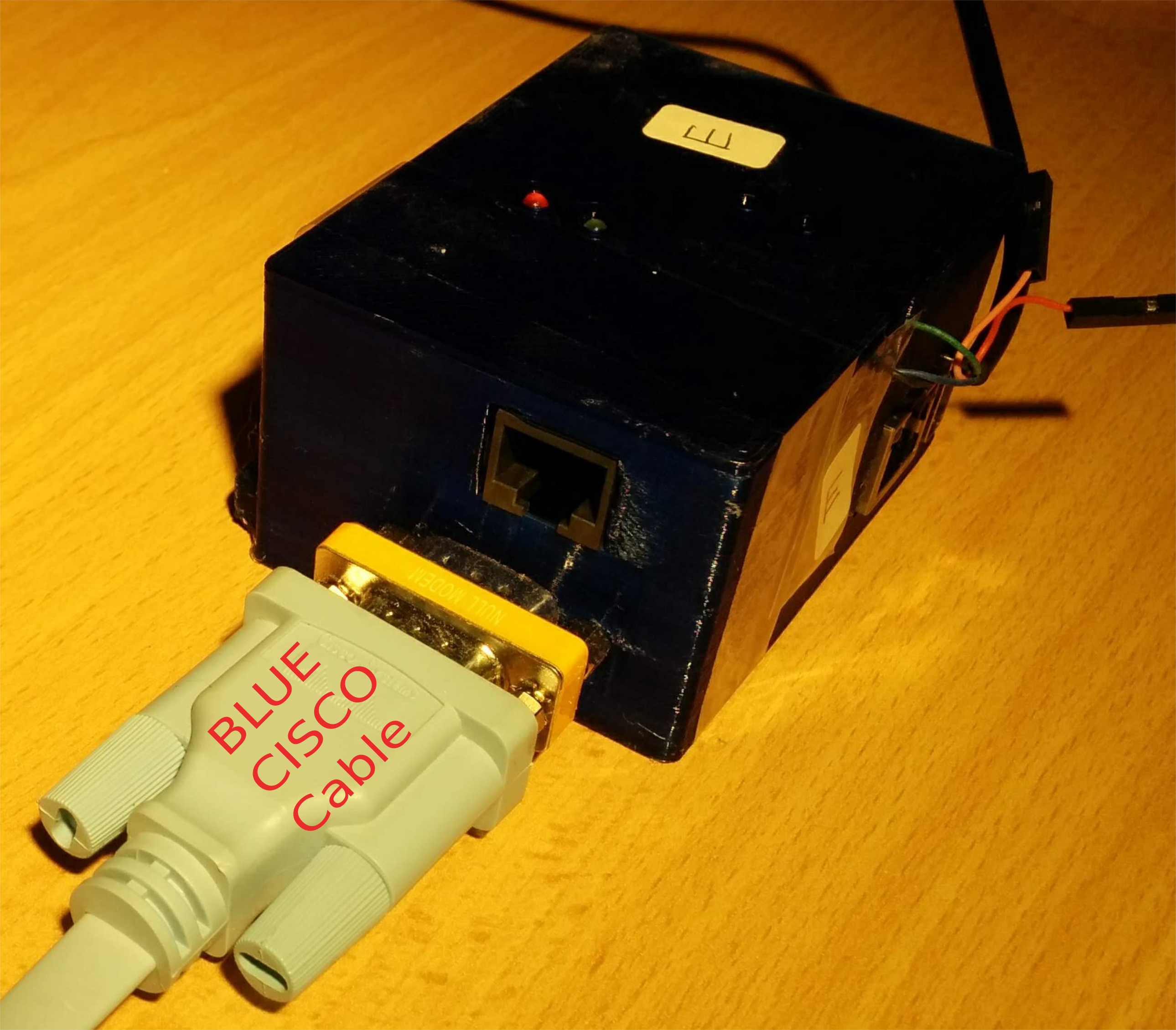
<p>The mark II case adds a serial port to the design making it capable of
doing Out-Of-Band management of router devices.  This is still a prototype,
the plan is to spin a board and produce a slightly smaller case:</p>

<p><img src="/images/bluecase-cisco-cable-labelled.png" alt="Hermes mark II prototype" /></p>

<p>A target design would be smaller, and would reduce heat dissipation.
An additional goal is to include one or more TTL outputs that could be
interfaced to something like the <a href="https://www.sparkfun.com/products/retired/10747">power-switch Tail</a></p>

<p>The devices are currently powered by USB, and do not require as much power
as typical RPI designs.  They are easily powered from available USB ports,
but if a management goal is to be able to power cycle systems, then causing
the management system to go off as well would be bad.</p>

<p>A stretch goal is therefore to be able to draw power from industry standard
PoE, while also passing PoE power <em>downstream</em> to the next Hermes device
in the daisy chain.  That goal is ambitious.</p>]]></content><author><name>phlow</name></author><category term="hermes" /><category term="hermes" /><category term="anima" /><summary type="html"><![CDATA[As part of developing a reference design of the ANIMA protocols, and validating the design, a platform was developed to run ANIMA.]]></summary></entry></feed>